🛒 Building a WhatsApp-Based Grocery Assistant in 3 Days Using n8n

 Image credit: Unsplash
1. Background
As a student living in the UK, balancing study, life, and cooking has been a challenge. Between coursework, lectures, and late-night study sessions, I often forget what’s already sitting in my fridge. This leads to the all-too-familiar outcome: buying groceries I already have, letting things expire, and ultimately wasting food and money.
I wanted a solution that didn’t require me to change my habits or download new apps, just something that worked where I already spend time: WhatsApp.
2. The Solution
I built a Grocery Assistant, an AI-powered tool that helps me:
- Extract items from receipt images and store them in a live inventory table
- Remind me of expiring items and help generate grocery lists
- Communicate entirely through WhatsApp, which I already use daily
This means no extra app installations, no switching platforms, just smart grocery help through a familiar interface.
🧪 Demo
Below are three short demo clips that showcase the main features of the WhatsApp-based Grocery Assistant:
📸 1. Receipt Upload → Inventory Update
A user sends a photo of a grocery receipt via WhatsApp. The assistant:
- Detects it as a receipt
- Extracts the items using AI
- Adds them to the inventory table
- Responds with a bullet-point confirmation of what was added
🛒 2. Generate Grocery List from Expiring Items
The user asks, “Give me grocery list based on expiring items”
The assistant checks for items that are low in quantity or expiring soon and replies with a smart grocery list.
❌ 3. Upload Non-Receipt Image
A user sends a random photo (e.g. a street sign or a product box). The assistant:
- Classifies it as not a receipt
- Transcribes visible text (if any)
- Responds politely, explaining that no grocery extraction was possible
🛢️ Using PostgreSQL with Supabase
To store and manage the grocery data, I used PostgreSQL hosted on Supabase. The schema consists of two key tables:
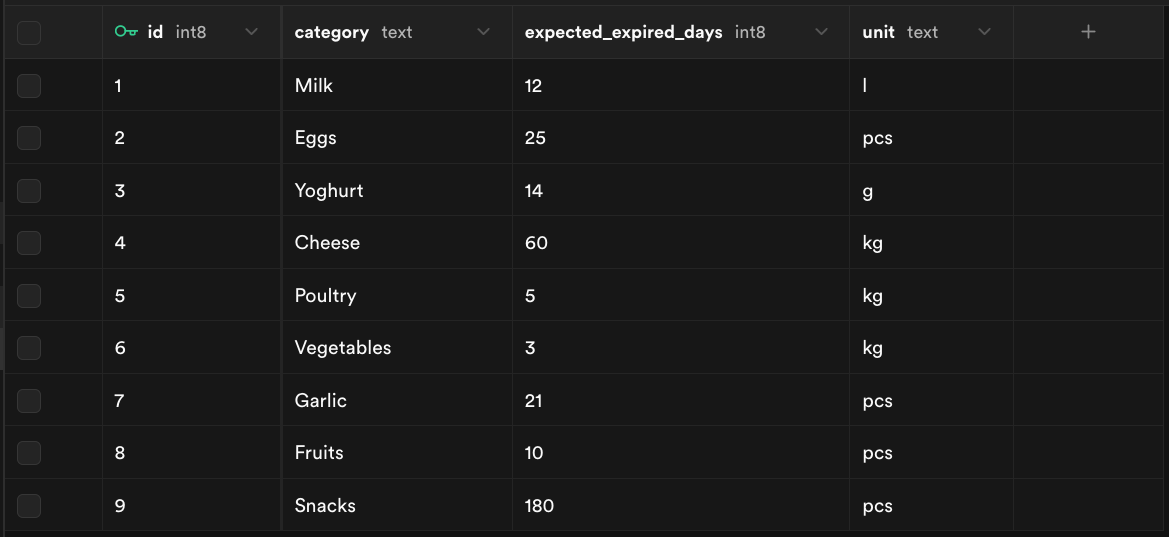
1. product_shelf_life
This is a reference table containing general knowledge about how long common grocery categories typically last. For example, Milk expires in 12 days, Vegetables in 3 days, Snacks in 180 days, etc.
2. inventory
This table records items extracted from receipts and keeps track of:
- Item name
- Product category
- Quantity and unit
- Inferred
expiry_date - Timestamp of purchase
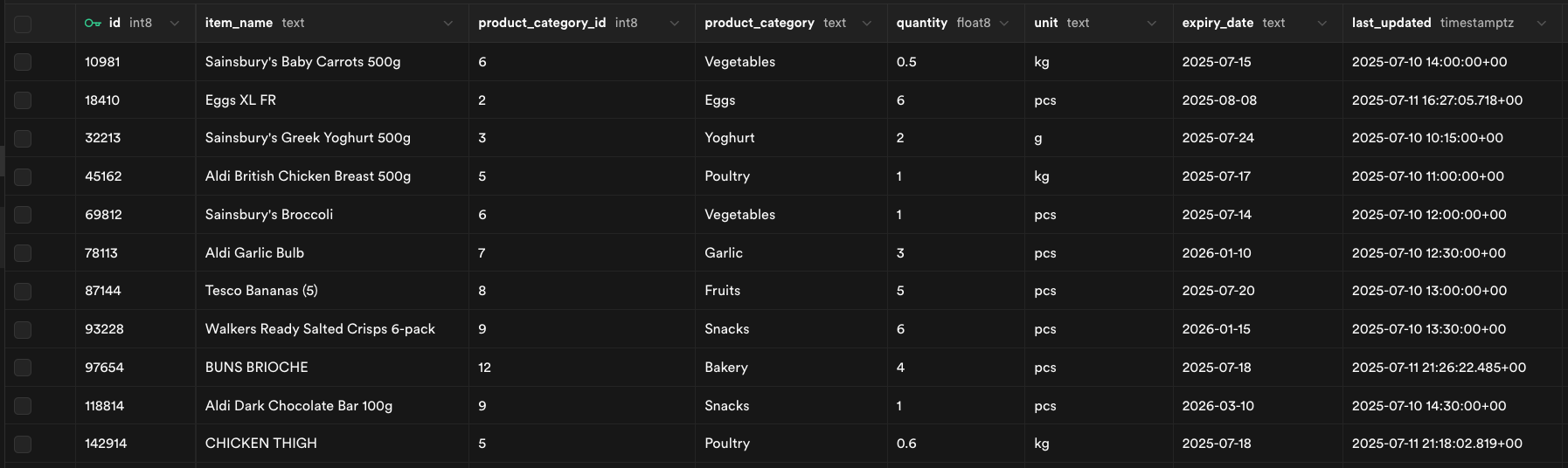
The expiry_date is automatically calculated as:
expiry_date = current_date + expected_expired_days
3. Prototyping with n8n
To build this fast, I used n8n, an open-source workflow automation tool. Why n8n?
- ✅ Low-code with visual logic
- ✅ Easy integration with WhatsApp (via Business API)
- ✅ Supports AI models and custom databases
- ✅ Fast iteration; I built and tested this in under 3 days
For prototypes like this, n8n is perfect. It’s modular, visual, and allows integrating AI tools with databases, HTTP endpoints, and messaging platforms with minimal boilerplate.
4. Workflow Breakdown
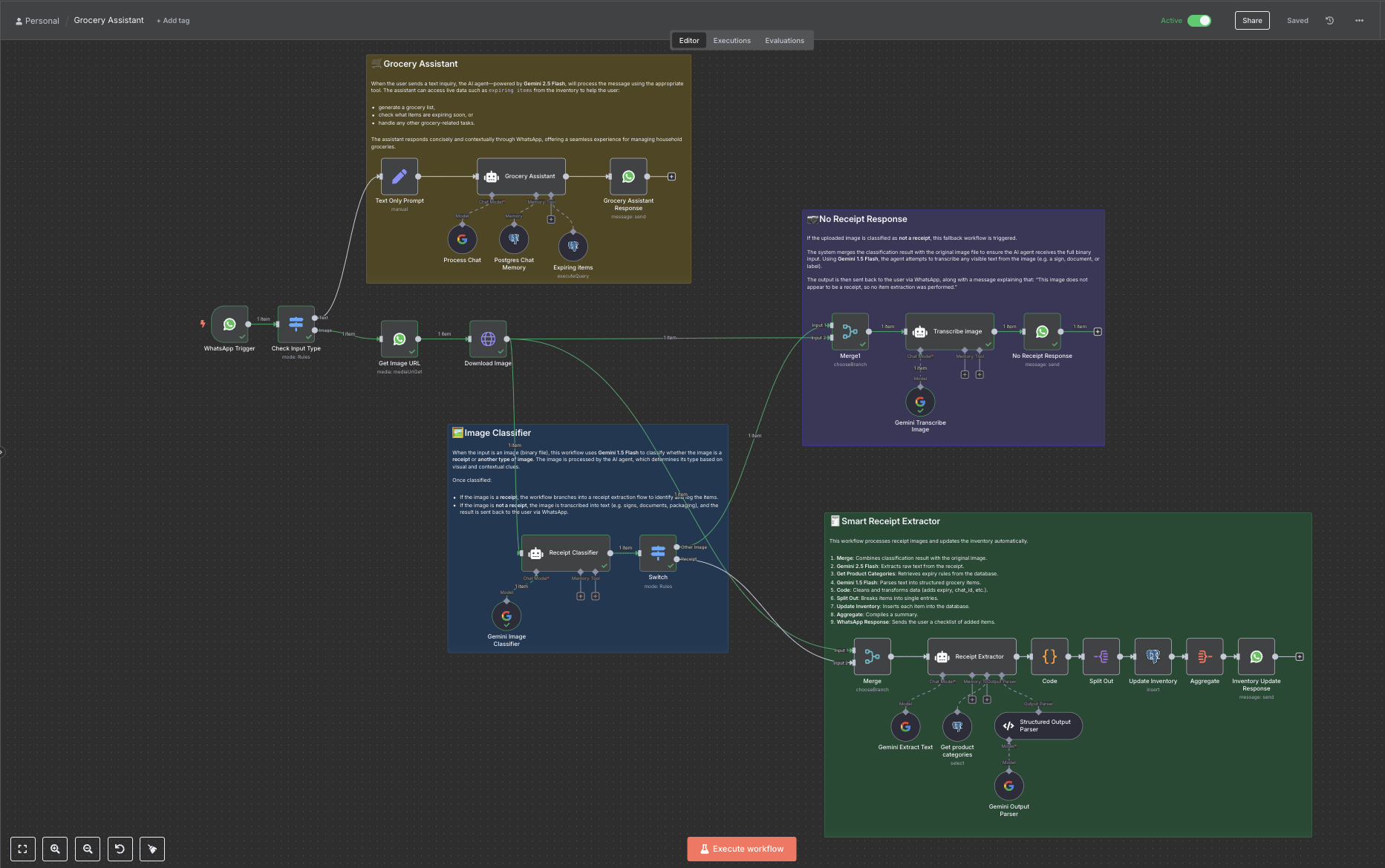
Let me walk you through the system design, as shown in the visual below:
🟫 Grocery Assistant
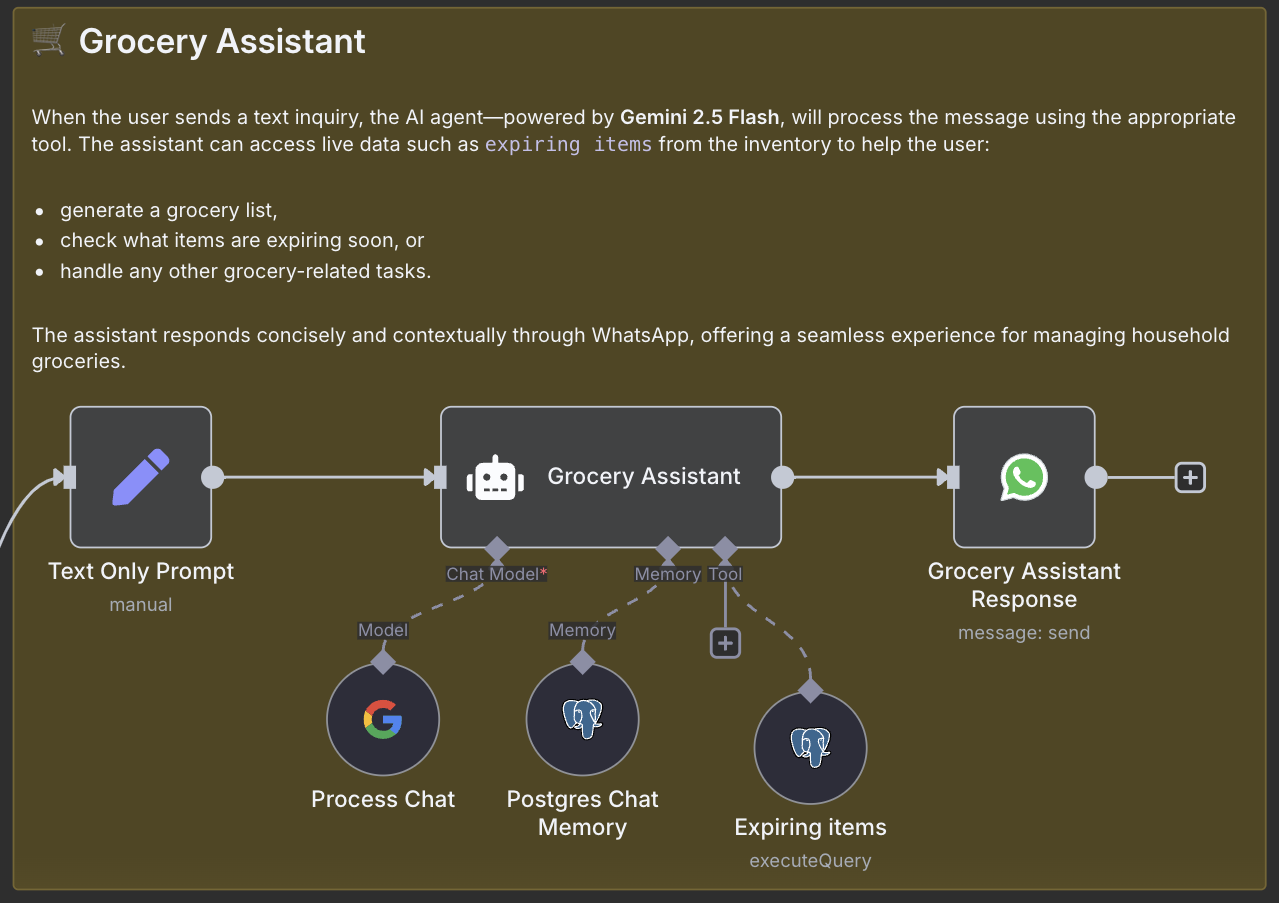
When a user sends a text message, the Grocery Assistant (powered by Gemini 2.5 Flash) processes it. It chooses the right tool based on intent: whether it’s to create a grocery list, check for expiring items, or ask about what’s in stock.
✅ Tools used:
Postgres Chat Memoryto access inventory dataExpiring Itemsto check for near-expiry products (connected with PostgreSQL)- Replies are sent directly back via WhatsApp.
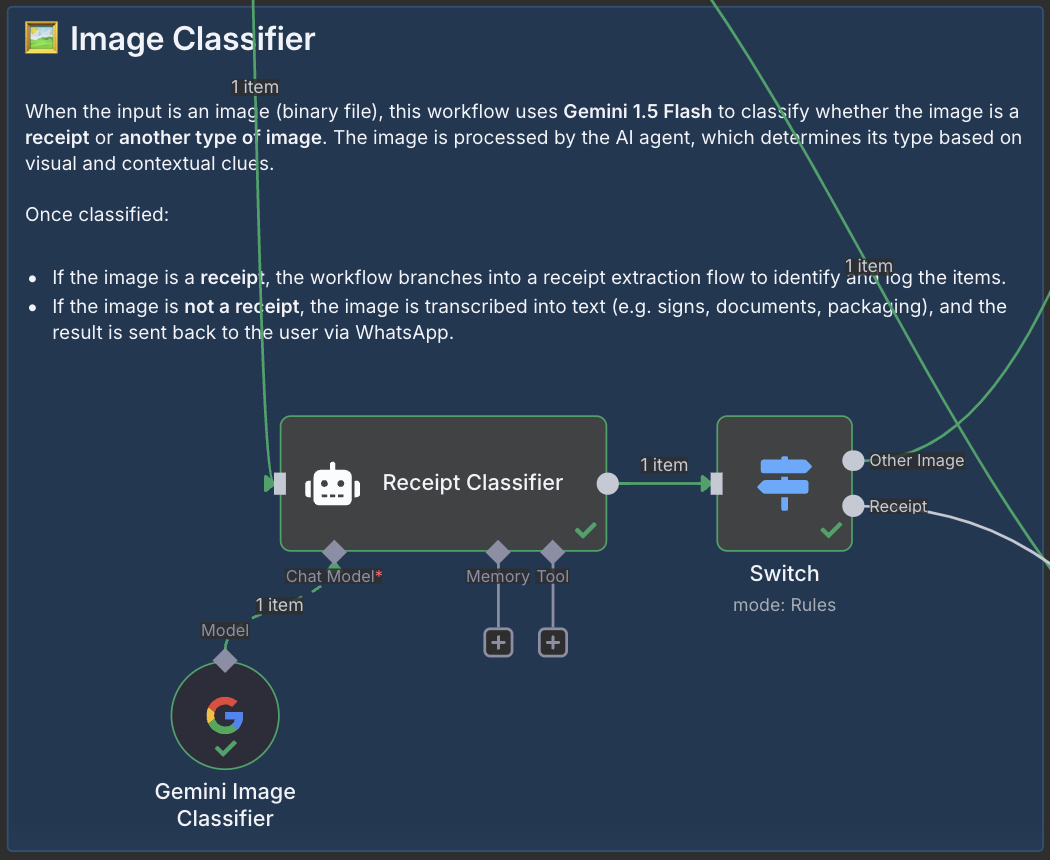
🟦 Image Classifier
If the input is an image (e.g., a photo of a receipt), it’s routed to the Image Classifier. This step uses Gemini 1.5 Flash to classify whether the image is a receipt or something else.
📌 Outcome:
- If it’s a receipt → go to receipt extractor.
- If not → transcribe and send the text back with a polite fallback.
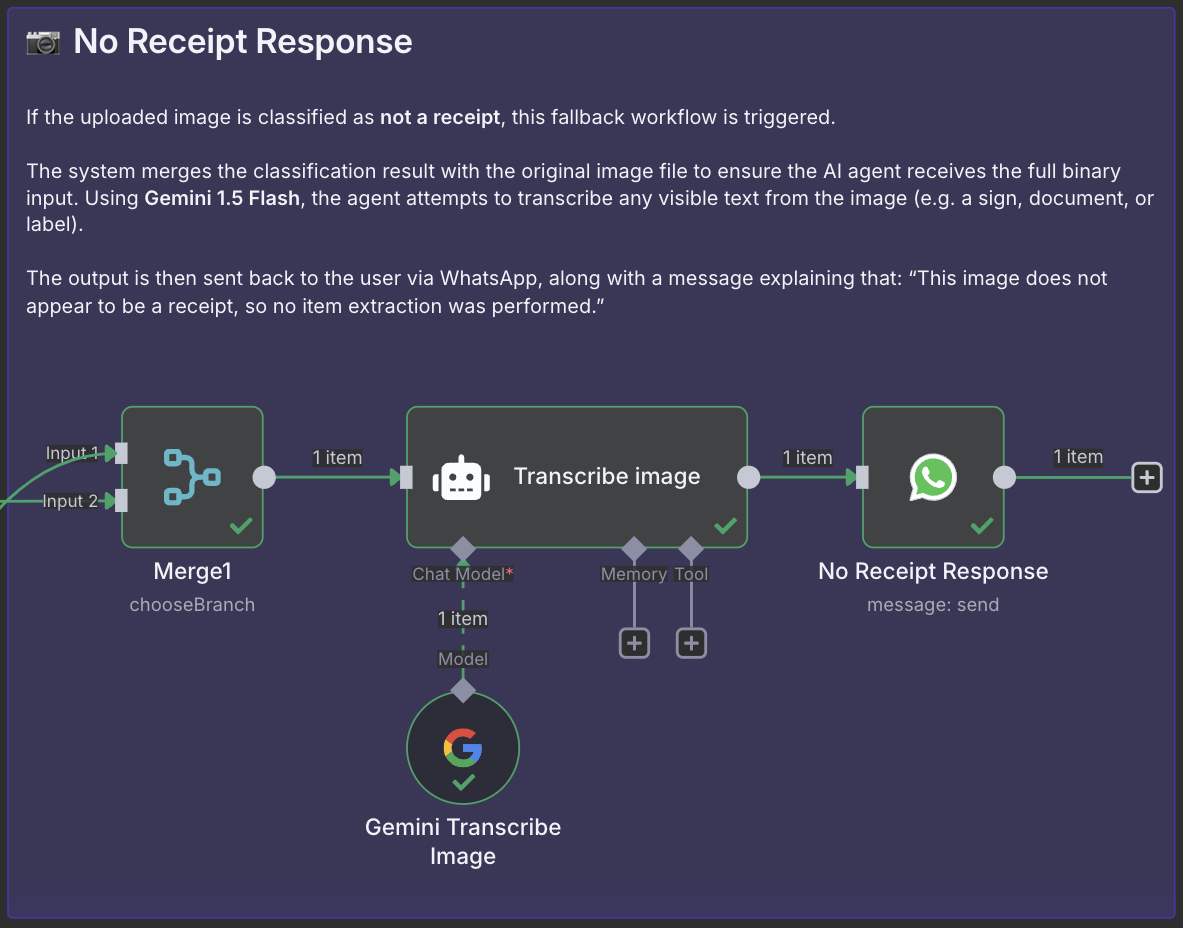
🟪 No Receipt Response
If the image is not a receipt, the system still makes use of it. The agent transcribes visible text using Gemini 1.5 Flash and replies via WhatsApp with the message:
“This image does not appear to be a receipt, so no extraction was performed.”
This ensures a graceful fallback and lets users know what’s happening.
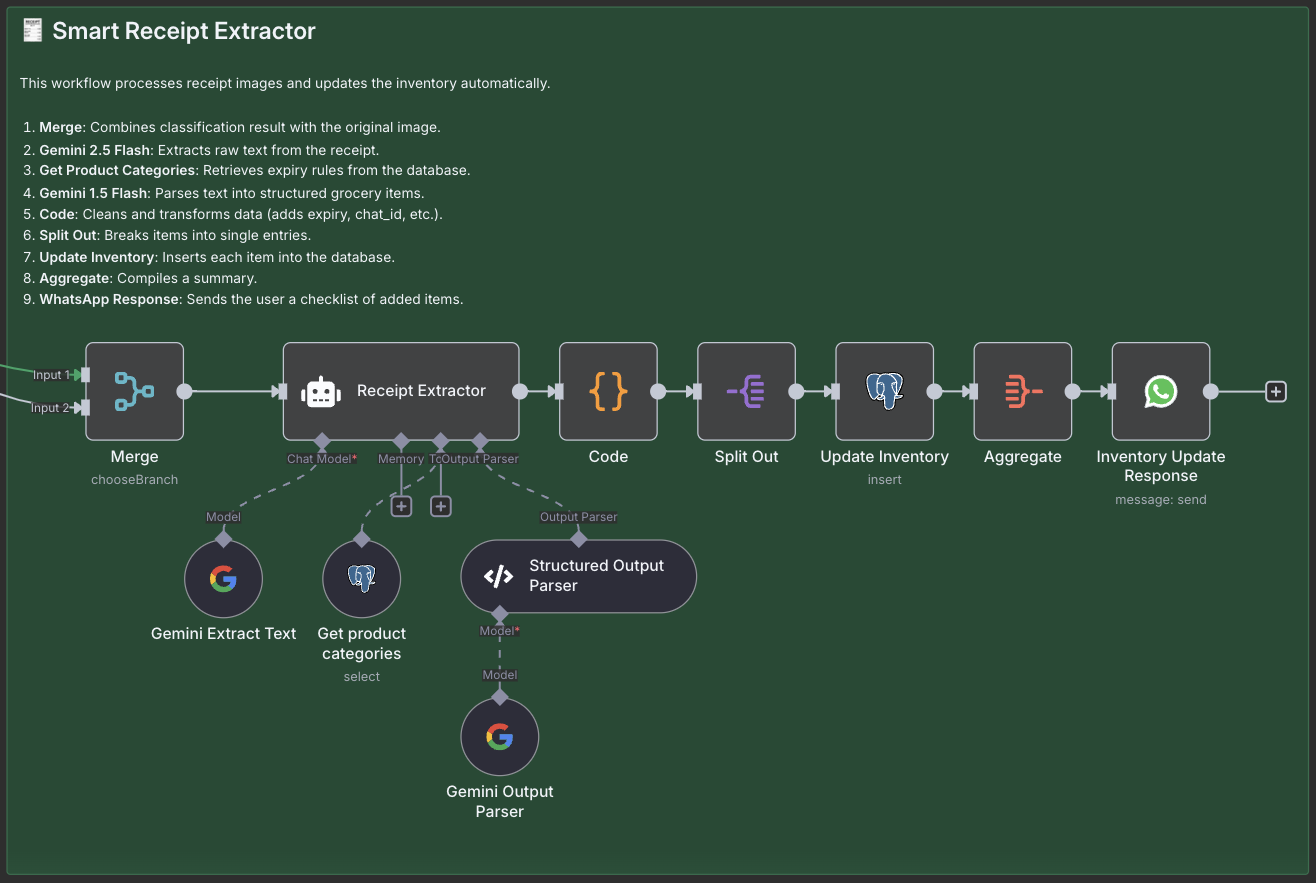
🟩 Smart Receipt Extractor
When a valid receipt is detected, the image goes through the Smart Receipt Extractor workflow:
- 🔗 Merge the binary image
- 📄 Extract raw text using Gemini 2.5 Flash
- 🗂️ Match products to known categories via database
- 🧠 Parse structured items with Gemini 1.5 Flash
- 🧹 Clean and transform the data (add expiry based on category shelf life)
- 🔄 Split items for individual inserts
- 🛒 Insert into PostgreSQL inventory
- 📬 Aggregate and send a WhatsApp checklist of added items
Despite being entirely no-code, this workflow handles multi-model orchestration, structured output parsing, and real-time database updates.
5. Conclusion
The Grocery Assistant works and it already saves me time and reduces food waste. It’s still a prototype, but the foundation is solid and extensible.
🛠️ What can be improved?
- 🔔 Add a cron job to send WhatsApp reminders when items are close to expiry
- 🧠 Improve product mapping by adding more granular shelf-life estimates per product name (not just by category)
- 🤖 Better handling of OCR errors from low-quality receipts
- 📊 Build a small dashboard to visualize inventory freshness trends
🧠 Final Thoughts on n8n
While I haven’t yet explored the feasibility of public, large-scale deployment using n8n, I found it incredibly powerful for prototyping and rapid iteration. Within just a few days, I was able to build a fully functional AI-powered grocery assistant with real database integration and WhatsApp automation, all without writing a full backend from scratch. For now, I see n8n as a reliable tool for internal workflows, testing ideas quickly, or building MVPs.
👉 Download the n8n workflow of the Grocery Assistant here